This article is for a very specific target group: Trainers who provide classroom or live training, supported by an online environment, and who would like to add e-learning.
If you fit into this target group, you already have your digital foundation in order. You have a website, a client portal, student administration, and an environment where participants can find their materials and lesson programmes. That is a very nice start.
As soon as you want to add e-learning here, you roughly have two options: you set up a system alongside it, or you add it to your own environment.
What do you need to offer e-learning?
Basically, you need two things: a Learning Management System (LMS) and an authoring tool.
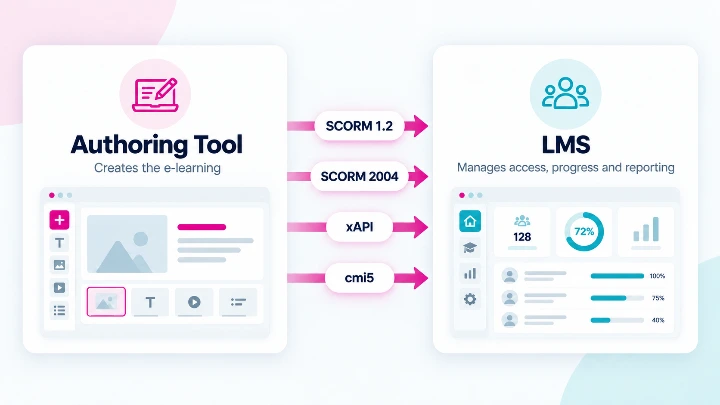
The Learning Management System
First of all, you need an LMS.
The LMS does not provide the content of the course, but everything around it. It determines, for example:
which student has access to which training;
whether someone has already started;
how far someone is;
whether the training has been completed;
what score someone has achieved;
and possibly whether a certificate should be issued.
For most organisations, it makes sense to use only one LMS.
The authoring tool
In addition, you need an authoring tool needed. That is software with which you create the e-learning yourself. Think of pages with text and video, interactive questions, exercises, tests and scenarios.
Examples of authoring tools are Articulate Rise, Easygenerator and Chameleon Creator.
The authoring tool is therefore the place where you develop the content of the training.
You can comfortably use multiple authoring tools side by side. Since the LMS is the central place, you can combine content from multiple authoring tools within it.
There are many authoring tools on the market, which are also competitively priced, so you can simply choose an existing tool for that. You don't have to reinvent the wheel here.
Exchange between the LMS and the authoring tool
The e-learning you create with an authoring tool must of course be able to communicate with the LMS. The LMS can, for example, pass on information about the learner. Conversely, the e-learning module provides information back about progress, completion and achieved scores.
This exchange occurs according to a standard. Commonly used standards are SCORM, xAPI and cmi5. More on that later.
Why a complete LMS is sometimes double work
An LMS contains functions for user management, clients, groups, registrations and reporting. But if you have your own website where clients can log in, you already have part of these matters in order.
Then an external LMS can cause unnecessary complexity. You then have two systems with the same users, two administrations and connections that need to be maintained. Additionally, an LMS can entail a significant investment.
If you find yourself in that situation, it may be wiser to expand your existing environment with the LMS functionalities that are still missing. Instead of placing a second system alongside your website, you can also make your existing customer environment your learning environment.
This does not mean that you have to program everything from scratch. In particular, the correct playback and registration of SCORM content can also be solved with existing components or services.
The standards
The most well-known standard is SCORM. A training course from, for example, Articulate Rise or Easygenerator can be exported as a SCORM package and then played in an LMS. Data such as progress, completion, and scores are exchanged.
The advantage is that you are not tied to a single supplier. You can use different authoring tools and possibly place the same content in a client's LMS.
In addition to SCORM, there are more modern standards such as xAPI and cmi5, which allow for more extensive learning activities and results to be recorded. You do not have to support all of them immediately, but it is wise to build your platform so that SCORM is not the only possible connection.
This is also commercially interesting
For trainers serving business clients, the latter is important.
Larger organisations often have their own LMS. And the Learning & Development department often requires that training can take place in that own LMS.
When your course is available as a SCORM package, you can deliver your training in a format that also fits into the client's LMS.
The same course can therefore be sold in different ways:
via your own learning environment;
to groups of employees of a client;
or as an e-learning package for the client's LMS.
Your e-learning module thus becomes a standalone digital product.
Start small
An initial version does not need to be extensive.
If you already have your own portal with users, learners, clients, and registrations, the first step can remain relatively straightforward.
These are the minimum requirements:
- The administrator must be able to add an e-learning package.
- A learner must be able to start the training and resume it later.
- The platform must be able to register whether the training has been completed.
- The platform must be able to register what result has been achieved.
With this, you can quickly offer professional e-learning.
Features such as extensive learning paths, badges, dashboards, competency management, and advanced learning analytics can be added later when there is actual demand for them.
And building your own authoring tool?
That could also become interesting later.
With modern development tools and AI-assisted development, it is becoming increasingly easier to develop your own software. In the long run, for example, you could build a simple editor that allows employees to create lessons, videos, questions, and tests themselves.
But the development does not have to start with that.
Good authoring tools already exist. By first using existing tools, you can focus on the training itself and on developing the learning platform.
If it later turns out that a proprietary authoring environment is strategically interesting, it can still be added.
Precisely because LMS and learning content are separated from each other, that possibility remains open.
A light foundation, with room to grow
For a trainer who already has their own client environment, a completely new LMS is not always the most logical step.
Often it is smarter to expand the existing environment with a light LMS layer and to use standards for the e-learning content.
SCORM is still a practical first step for that. It makes it possible to use existing authoring tools and potentially deliver the same training to clients with their own LMS.
At the same time, you can take modern standards such as xAPI and cmi5 into account in the design.
This creates a solution that can start small, but does not have to remain small.
Do you want to add e-learning to a client portal that you already have?
We are happy to think along with you about what you can retain, which LMS functionality you really need, and how you can smartly implement SCORM, xAPI, or cmi5. This way, you avoid implementing a large new system while a relatively light expansion may already be sufficient.